推出“首个”芯片解耦集合通信技术,众智 FlagOS 支持同/异构全场景互联互通
FlagCX统一通信库发布v0.7.0版本,新增uniRunner全场景统一模式,实现同构/异构芯片的互联互通。该版本基于Kernel-free Non-reduce技术,通过Device-buffer IPC/RDMA能力实现芯片解耦,无需依赖厂商原生通信库。性能测试显示,异构场景下通信带宽提升最高达4.57倍,同时支持10款主流AI芯片。新版本还提供了多芯片编译指南和PyTorch DDP测试
近日,众智 FlagOS 系统软件栈旗下统一通信库 FlagCX 正式发布 v0.7.0 版本。本次版本在原有 homoRunner(同构通信)、hostRunner(CPU 中转通信) 与 hybridRunner(异构分层通信) 三大模式基础上,重磅推出全新的 uniRunner 全场景统一模式,实现同构和异构全场景的互联互通。
FlagCX v0.7.0版本:https://github.com/flagos-ai/FlagCX/releases/tag/v0.7.0

(由AI生成)
相比于其他模式,uniRunner具备以下三大优势。
-
通用性优势显著:基于 Kernel-free Non-reduce 集合通信技术,并依托 FlagOS 社区自研的 Device-buffer IPC/RDMA 能力,uniRunner 实现了真正意义上的芯片解耦,无需依赖厂商原生通信库即可覆盖所有同构与异构场景,有助于新芯片快速获得完整通信能力,具备极强的扩展性。
-
性能潜力巨大:当前uniRunner实现还是早期非常基础的版本,但已展现出显著的性能收益。在同构场景下,一些通信原语已经能持平厂商原生优化后的通信库(homoRunner),而在异构场景能达到之前实现(HybridRunner)的4.57倍。进一步优化后,将能在更多通信原语上获得性能优势。
-
协同优化能力强:借助 uniRunner “零计算资源占用” 的特点,非常有利于与上层训练与推理框架的深度融合,使通信调度和模型计算能更紧密协同和重叠,从而在端到端性能优化方面获得更大的整体收益。
截至目前,FlagCX在硬件生态方面已累计支持 10 款芯片,包括英伟达、天数、寒武纪、沐曦、昆仑芯、海光、华为、摩尔线程、AMD和清微智能(新增)。值得说明的是,此次新增支持的清微智能可重构计算芯片,进一步证明了 FlagCX 统一通信库在跨芯片兼容性上的持续突破,使其在适配多架构、多类型 AI 芯片方面迈上了新的台阶。
本文将重点围绕以下信息,步步深入技术细节,探索FlagCX新版本的强大能力!
-
核心技术解析:深入解读 uniRunner 模式下芯片解耦Kernel-free Non-reduce集合通信技术
-
超全汇总:不同芯片品牌适配FlagCX接口
-
芯片快速使用FlagCX指南:以英伟达、清微智能、海光、寒武纪等为例,跑通多芯/跨芯通信、PyTorch DDP测试和异构混训
一、uniRunner模式下的芯片解耦,Kernel-free Non-reduce集合通信
(一)多Runner支持
新版本FlagCX在原有的多种Runner分别满足各自场景的基础上,新增uniRunner。它基于自研的Device-buffer IPC/RDMA技术,最终实现了全场景通用、且与芯片解耦的Kernel-free Non-reduce集合通信。
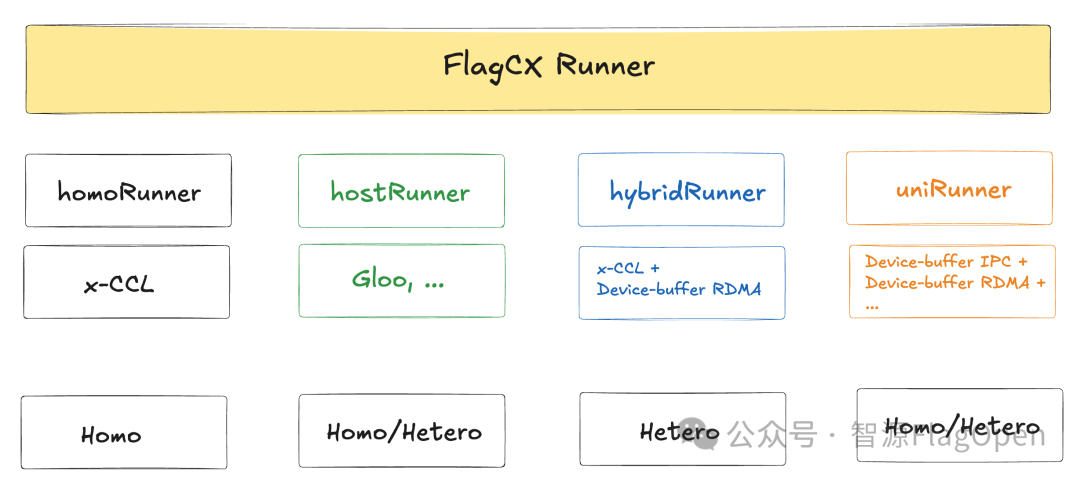
Homo(同构):由单一芯片组成的场景;
Hetero(异构):由多种芯片组成的场景
|
Runner类型 |
适用场景&特点 |
技术细节 |
测试案例 |
|
homoRunner |
仅支持同构场景 发起通信Kernel |
CCLAdaptor (x-CCL) |
ChipA + ChipA |
|
hostRunner |
支持全场景 CPU中转通信 |
CCLAdaptor (Gloo, ...) |
ChipA + ChipA/Chip B |
|
hybridRunner |
仅支持异构场景 Cluster内x-CCL+Cluster间RDMA |
CCLAdaptor (x-CCL) + Device-buffer RDMA |
ChipA + ChipB |
|
uniRunner |
支持全场景 节点内IPC+节点间RDMA,无Kernel |
Device-buffer IPC + Device-buffer RDMA |
ChipA + ChipA/ChipB |
-
homoRunner:通过CCLAdaptor直接调用厂商自研通信库接口,充分复用厂商自研通信库能力。该Runner专为同构通信场景设计,在设备一致、拓扑稳定的场景下能获得最佳性能
-
hostRunner:通过CCLAdaptor直接调用主机通信库接口(Gloo、MPI、Bootstrap等),结合 DeviceAdaptor的MemcpyH2D/D2H实现CPU中转通信,实现对任意设备组合的支持。该Runner覆盖所有硬件场景,是最具兼容性的保底方案
-
hybridRunner:通过CCLAdaptor直接调用厂商自研通信库接口,结合DeviceAdaptor的HostFunc/GdrMalloc/MemcpyD2D等接口,实现基于Device-buffer RDMA的Cluster-to-Cluster分层集合通信。该Runner适用于异构通信场景,支持跨芯集合通信
-
uniRunner:通过DeviceAdaptor的HostFunc/GdrMalloc/IpcMemHandle/MemcpyD2D等接口,实现基于Device-buffer IPC和Device-buffer RDMA的跨节点和节点内统一通信机制,该Runner适用于包括同构、异构在内的所有场景,完全和芯片解耦,无需调用通信kernel即可支持全场景Non-reduce集合通信
(二)Device-buffer IPC和Device-buffer RDMA技术原理
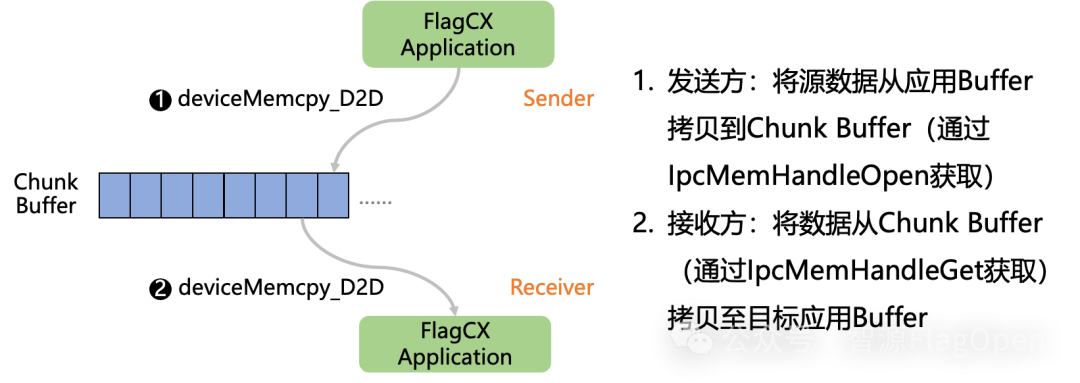
Device-buffer IPC
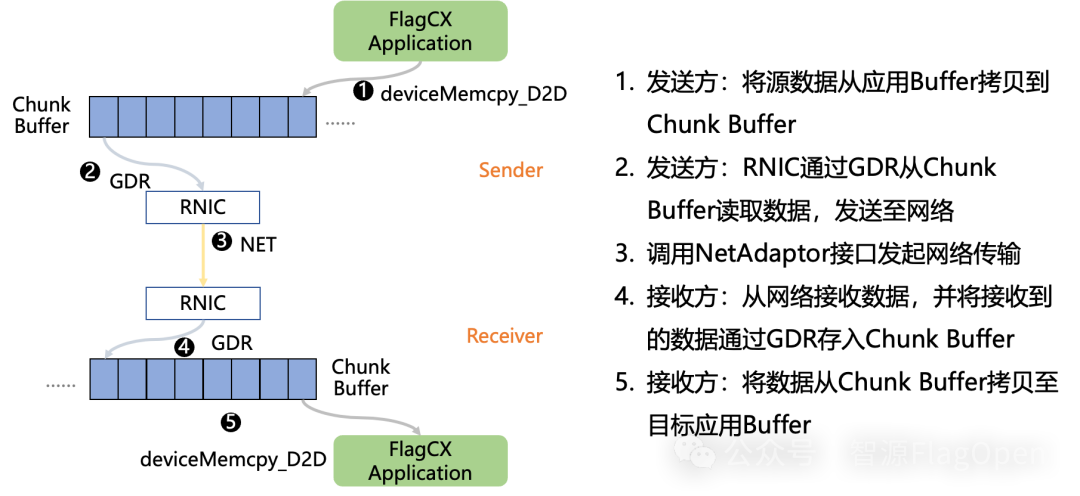
Device-buffer RDMA
可以看到,Device-buffer IPC和Device-buffer RDMA两者技术实现思路类似,Device-buffer IPC负责节点内通信,Device-buffer RDMA负责节点间通信。两者共同协作实现同/异构全场景互联互通。
(三)不同场景下,芯片解耦Kernel-free Non-reduce集合通信性能对比
众智FlagOS系统下统一通信库FlagCX推出的uniRunner模式,已通过Device-buffer IPC/RDMA技术支持的Kernel-free Non-reduce集合通信支持以下常见的通信操作,包括SendRecv、AlltoAll、AlltoAllv、Broadcast、Gather、Scatter、AllGather等。同时,已经在英伟达、海光、清微智能三种不同架构的AI芯片上验证通过。
下面,我们将通过一组数据进行对比,以了解不同芯片品牌组合下,使用不同FlagCX Runner的性能情况。
1、芯片同构场景,Kernel-free Non-reduce 集合通信技术在uniRunner与homoRunner模式下的对比
ChipA + ChipA
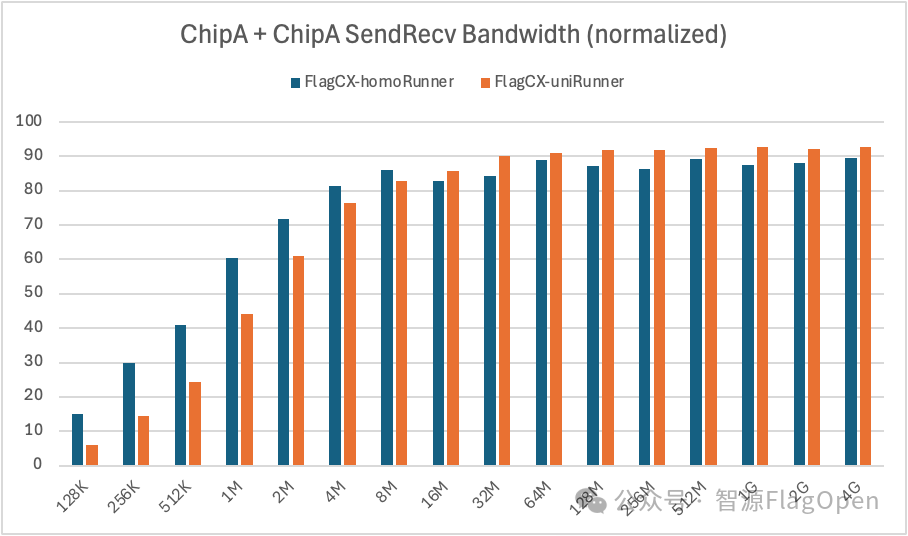
SendRecv:在通信量>=16MB时,uniRunner带宽大约达到homoRunner的105%;在通信量<16MB时,uniRunner带宽大约达到homoRunner的70%。
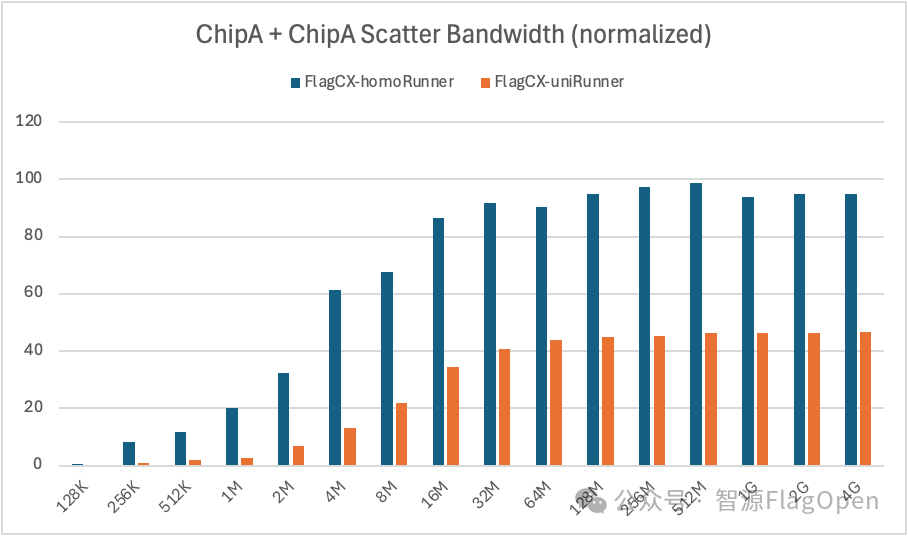
Scatter:uniRunner带宽大约达到homoRunner的36%。
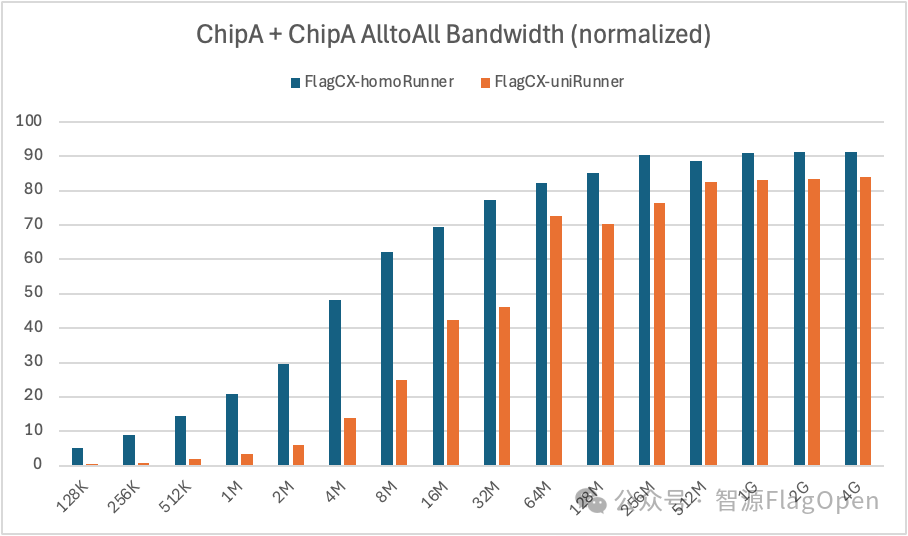
AlltoAll:在通信量>=64MB时,uniRunner带宽大约达到homoRunner的90%;在通信量<64MB时,uniRunner带宽大约达到homoRunner的28%。
ChipB + ChipB
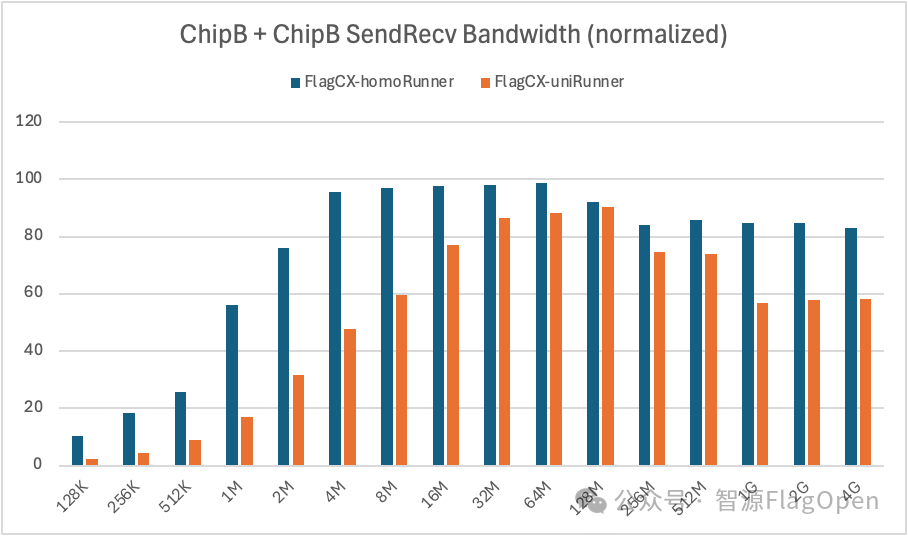
SendRecv:uniRunner带宽大约达到homoRunner的62%。
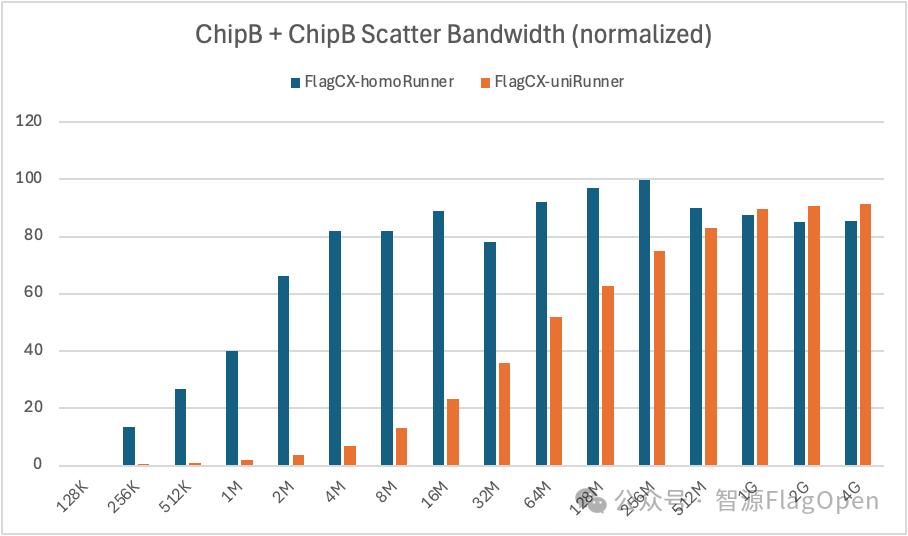
Scatter:在通信量>=1GB时,uniRunner带宽大约达到homoRunner的105%;在通信量<1GB时,uniRunner带宽大约达到homoRunner的55%。
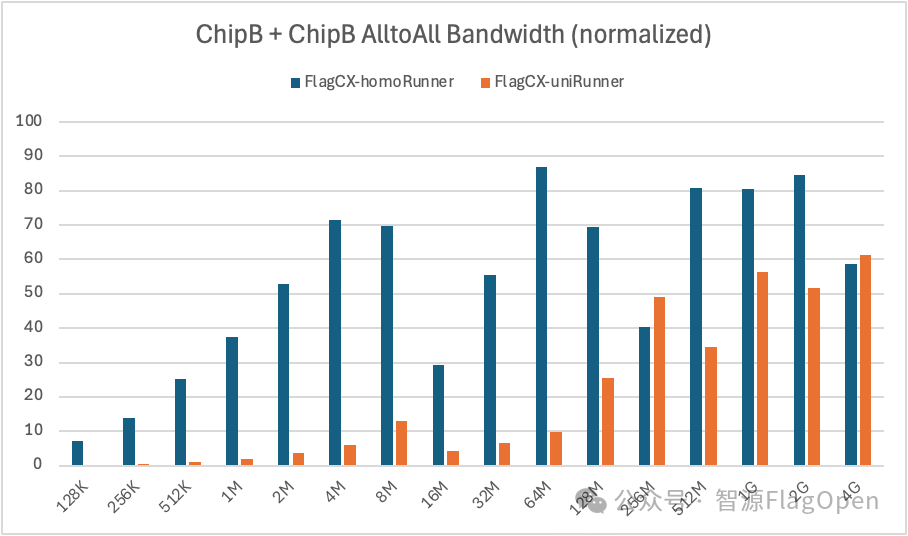
AlltoAll:uniRunner带宽大约达到homoRunner的33%。
2、芯片异构场景,Kernel-free Non-reduce 集合通信技术在uniRunner与hybridRunner的对比
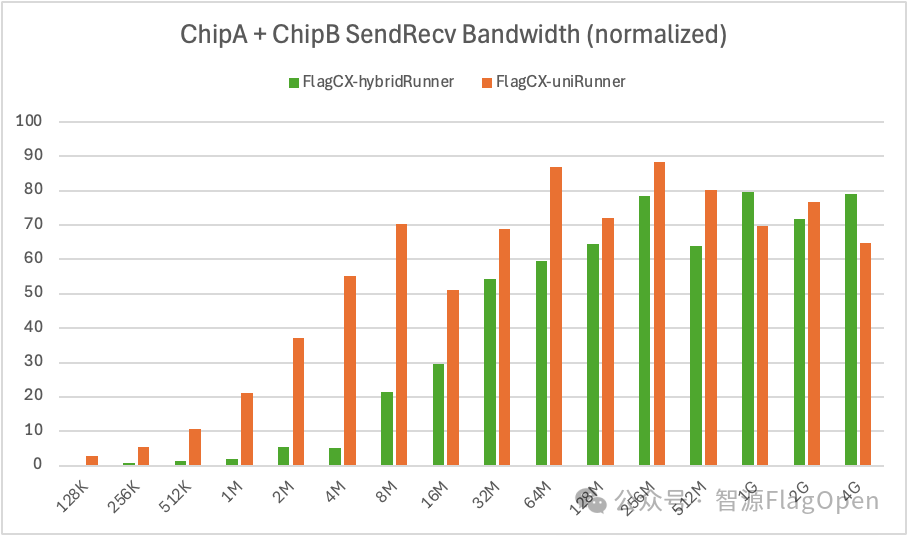
SendRecv:uniRunner带宽大约达到hybridRunner的457%。
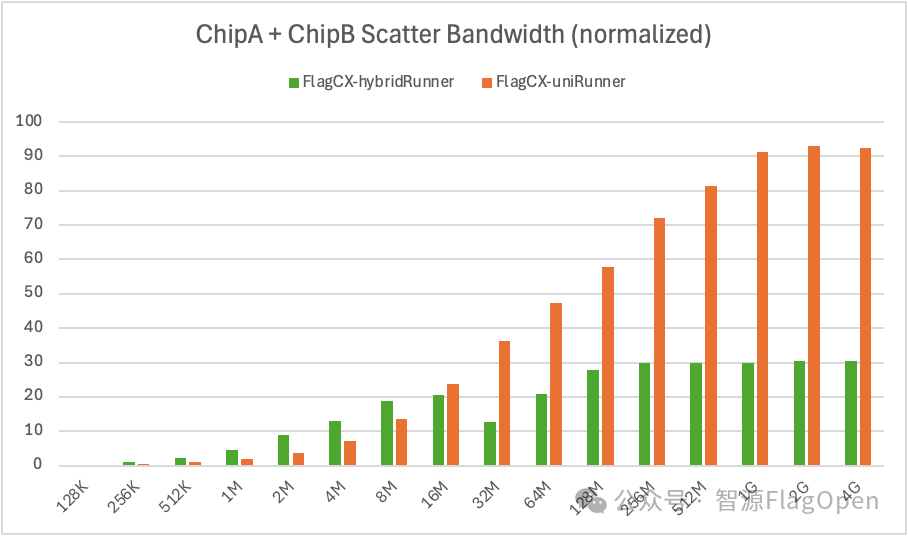
Scatter:uniRunner带宽大约达到hybridRunner的165%。
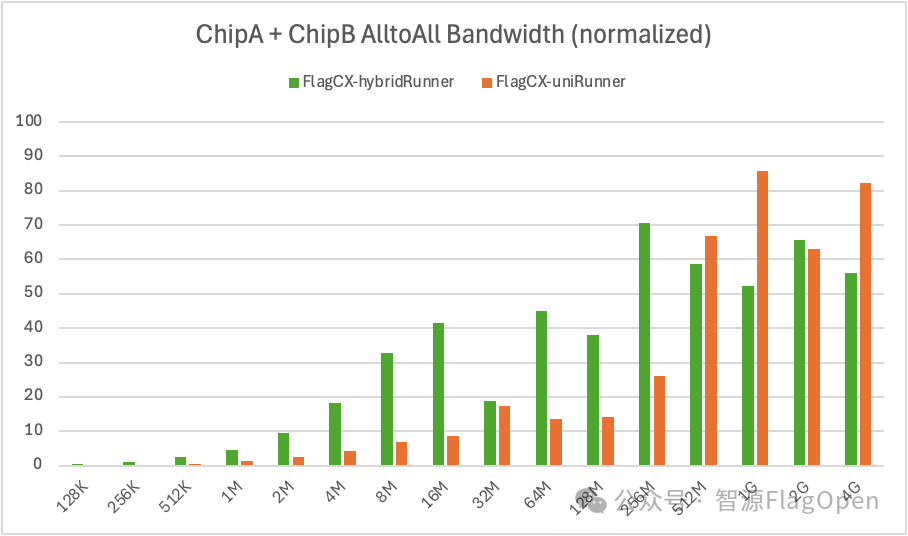
AlltoAll:uniRunner带宽大约达到hybridRunner的57%。
通过对比可以发现 :
-
在 uniRunner 模式下,Kernel-free Non-reduce 集合通信技术依托 Device-buffer IPC/RDMA 能力,无需依赖任何厂商原生通信库,即可在全场景实现 Non-reduce 集合通信操作的互联互通。与此同时,该方案不需要发起通信 kernel,也不占用计算资源,因此在多芯片、多场景下具备极强的可移植性和扩展性。
-
虽然现在的uniRunner还是早期非常基础的版本,但已展现出显著的性能收益,在同构场景一些通信原语已经能持平厂商原生优化后的通信库(homoRunner),而在异构场景能达到之前方案(HybridRunner)的4.57倍(主要源于小通信量性能提升)。下一步我们将继续优化,包括但不限于:小通信量场景的零拷贝优化、动态调节 buffer size 与 chunk size、支持 ring/tree 等更多通信算法等。同时,基于 uniRunner “零计算资源占用” 的特性,我们还将探索其与上层框架的融合,推动端到端的性能优化。
此外,uniRunner 未来还将支持 AllReduce、ReduceScatter、Reduce 等规约类集合通信操作,最终形成一套完全与芯片解耦、可覆盖多场景的高性能统一集合通信方案。
二、芯片企业适配接口汇总
针对不同Runner,厂商只需要适配FlagCX PAL模块(Portable Abstraction Layer)的不同接口,具体如下:
|
Runner类型 |
PAL接口 |
|
|
CCLAdaptor |
DeviceAdaptor |
|
|
homoRunner |
x-CCLAdaptor |
Basic functions, Stream functions, Event functions |
|
hostRunner |
- |
As above |
|
hybridRunner |
x-CCLAdaptor |
As above, plus launchHostFunc, GDR functions |
|
uniRunner |
- |
As above, plus IpcMemHandle functions |
其中,CCLAdaptor负责提供自定义通信库相关APIs,DeviceAdaptor负责提供自定义设备运行时相关APIs。具体定义可访问 github.com/flagosai/FlagCX/blob/main/flagcx/adaptor/include/adaptor.h
参考flagcx/adaptor/include/adaptor.h文件中的定义。
当前各厂商适配情况如下:
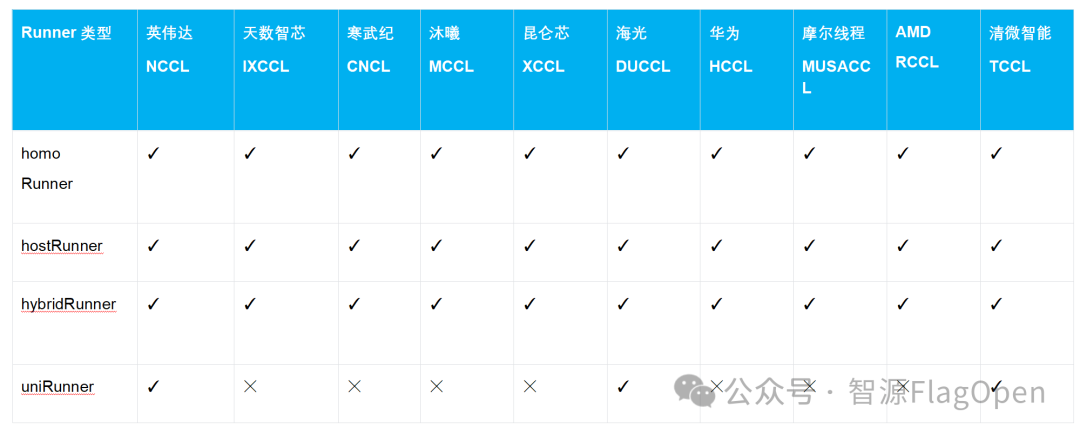
三、芯片快速使用FlagCX指南
(一)一键编译跑通多芯/跨芯通信
以英伟达、海光、清微智能测试机器为例,测试环境已备好,包括容器、SSH免密等。
英伟达
# Compile library
cd /root && git clone https://github.com/flagos-ai/FlagCX.git && cd FlagCX
make USE_NVIDIA=1 -j$(nproc)

# Compile test cases
cd test/perf
make USE_NVIDIA=1 MPI_HOME=/path/to/mpi -j$(nproc)

# Run homo tests
/path/to/mpi/bin/mpirun -np 8 -hosts 127.0.0.1:8 \
    -genv PATH=/path/to/mpi/bin:$PATH \
    -genv LD_LIBRARY_PATH=/path/to/mpi/lib:$LD_LIBRARY_PATH \
    -genv FLAGCX_IB_HCA=mlx5 \
    -genv FLAGCX_ENABLE_TOPO_DETECT=TRUE \
    /root/FlagCX/test/perf/"test_allreduce" -b 128K -e 4G -f 2 -w 5 -n 100 -p 1

# Run hetero tests on Nvidia+Hygon platforms
/path/to/mpi/bin/mpirun -np 16 -hosts ip1:8,ip2:8 \
    -genv PATH=/path/to/mpi/bin:/usr/local/neuware/bin:$PATH \
    -genv LD_LIBRARY_PATH=/path/to/mpi/lib:/usr/local/neuware/lib64:$LD_LIBRARY_PATH \
    -genv FLAGCX_IB_HCA=mlx5 \
    -genv FLAGCX_ENABLE_TOPO_DETECT=TRUE \
    /root/FlagCX/test/perf/"test_allreduce" -b 128K -e 4G -f 2 -w 5 -n 100 -p 1
海光
# Compile library
source /usr/local/bin/fastpt -E
cd /root && git clone https://github.com/flagos-ai/FlagCX.git && cd FlagCX
make USE_DU=1 -j$(nproc)

# Compile test cases
cd test/perf
make USE_DU=1 MPI_HOME=/path/to/mpi -j$(nproc)

# Run homo tests
/path/to/mpi/bin/mpirun -np 8 -hosts 127.0.0.1:8 \
    -genv PATH=/path/to/mpi/bin:$PATH \
    -genv LD_LIBRARY_PATH=/path/to/mpi/lib:$LD_LIBRARY_PATH \
    -genv FLAGCX_IB_HCA=mlx5 \
    -genv FLAGCX_ENABLE_TOPO_DETECT=TRUE \
    /root/FlagCX/test/perf/"test_allreduce" -b 128K -e 4G -f 2 -w 5 -n 100 -p 1
清微智能
# Compile library
cd /root && git clone https://github.com/flagos-ai/FlagCX.git && cd FlagCX
make USE_TSM=1 -j$(nproc)

# Compile test cases
cd test/perf
make USE_TSM=1 MPI_HOME=path/to/mpi -j$(nproc)

# Run homo tests
/path/to/mpi/bin/mpirun -np 8 -hosts 127.0.0.1:8 \
    -genv PATH=/path/to/mpi/bin:/usr/local/kuiper/bin:$PATH \
    -genv LD_LIBRARY_PATH=/path/to/mpi/lib:/usr/local/kuiper/lib:$LD_LIBRARY_PATH \
    -genv FLAGCX_IB_HCA=mlx5 \
    -genv FLAGCX_ENABLE_TOPO_DETECT=TRUE \
    /root/FlagCX/test/perf/"test_allreduce" -b 128K -e 4G -f 2 -w 5 -n 100 -p 1
(二)一键编译跑通PyTorch DDP测试
以英伟达、海光测试机器为例,测试环境已备好,包括PyTorch安装、FlagCX库安装等。
英伟达
# Install flagcx backend
cd /root/FlagCX/plugin/torch
python setup.py --adaptor nvidia

cd example
# Run homo tests
torchrun --nproc_per_node 8 --nnodes=1 --node_rank=0 --master_addr="localhost" --master_port=8281 example.py
# Run hetero tests
export FLAGCX_ENABLE_TOPO_DETECT=TRUE
export FLAGCX_IB_HCA=mlx5
torchrun --nproc_per_node 8 --nnodes=2 --node_rank=0 --master_addr="ip1" --master_port=8281 example.py
海光
# Install flagcx backend
source /usr/local/bin/fastpt -E
cd /root/FlagCX/plugin/torch
python setup.py --adaptor du

cd example
# Run homo tests
torchrun --nproc_per_node 8 --nnodes=1 --node_rank=0 --master_addr="localhost" --master_port=8281 example.py
# Run hetero tests
export FLAGCX_ENABLE_TOPO_DETECT=TRUE
export FLAGCX_IB_HCA=mlx5
torchrun --nproc_per_node 8 --nnodes=2 --node_rank=1 --master_addr="ip1" --master_port=8281 example.py
(三)FlagScale+FlagCX跑通异构混训
以英伟达、寒武纪机器为例,测试环境已备好,包括FlagCX PyTorch Plugin安装、模型权重、训练数据等。
英伟达
# Activate FlagScale training env
conda activate flagscale-train

# Unpatch training backend code
cd /root && git clone https://github.com/flagos-ai/FlagScale.git && cd FlagScale
python tools/patch/unpatch.py --backend Megatron-LM

# Modify training configs
...

# Run hetero training
python run.py --config-path examples/llama3/conf/ --config-name train_hetero_8b action=run
寒武纪
# Activate FlagScale training env
conda activate flagscale-train

# Unpatch training backend code
cd /root && git clone https://github.com/flagos-ai/FlagScale.git && cd FlagScale
python tools/patch/unpatch.py --backend Megatron-LM FlagScale --task train  --device-type Cambricon_MLU

# Modify training configs
...
在执行训练命令前,需要先修改相关文件,具体如下:
1. examples/llama3/conf/train_hetero_8b.yaml
defaults:
  - train: 8b_hetero
  - _self_

experiment:
  exp_name: llama3_8b_hetero
  exp_dir: ./outputs_llama3_8b_hetero
  task:
    type: train
    backend: megatron
    entrypoint: ./flagscale/train/hetero/train_gpt.py
  runner:
    backend: torchrun
    ssh_port: 8221
    nnodes: 2
    nproc_per_node: 8
    rdzv_backend: static
    hostfile: /root/hostfile
  envs:
    FLAGCX_IB_HCA: mlx5
    FLAGCX_ENABLE_TOPO_DETECT: TRUE
    PATH: /path/to/mpi/bin:/usr/local/neuware/bin:$PATH
    LD_LIBRARY_PATH: /path/to/mpi/lib:/usr/local/neuware/lib64:$LD_LIBRARY_PATH
    mlu590:
      ROOT_DIR: /root/FlagScale/build/Cambricon_MLU/FlagScale
      MLU_VISIBLE_DEVICES: 0,1,2,3,4,5,6,7
      CNCL_IB_RELAXED_ORDERING_ENABLE: 1
      CNCL_MLULINNK_OVER_ROCE_DISABLE: 1
      CNCL_MLU_DIRECT_LEVEL: 1
      CNCL_IB_GID_INDEX: 3
    A800:
      ROOT_DIR: /root/FlagScale
      CUDA_VISIBLE_DEVICES: 0,1,2,3,4,5,6,7
      CUDA_DEVICE_MAX_CONNECTIONS: 1
action: run

hydra:
  run:
    dir: ${experiment.exp_dir}/hydra
2. examples/llama3/conf/train/8b_hetero.yaml
system:
  distributed_backend: flagcx
  tensor_model_parallel_size: 4
  pipeline_model_parallel_size: 8
  add_qkv_bias: True
  disable_bias_linear: True
  use_flash_attn: True
  sequence_parallel: False
  use_distributed_optimizer: True
  precision:
    bf16: True
    attention_softmax_in_fp32: true
    accumulate_allreduce_grads_in_fp32: true
  logging:
    log_interval: 1
    tensorboard_log_interval: 1
    wandb_project: "train-llama3-8B"
    wandb_exp_name: "train-test-8B"
  checkpoint:
    load: outputs_llama3/checkpoint_mc
    save_interval: 10
    finetune: True
    ckpt_format: "torch"
  hetero:
    enable_hetero: True
    hetero_use_cpu_communication: False
    # mesh format [tp1,cp1,ep1,dp1,pp1,(tp2,cp2...)]

    # 2 mesh, diff tp dp pp
    hetero_pipeline_layer_split: [4,4,4,4,4,4,4,4]
    hetero_process_meshes: [1, 1, 1, 2, 4, 1, 1, 1, 2, 4]
    hetero_device_types: ["A800", "mlu590"]

    standalone_embedding_stage: False
    hetero_current_device_type: "A800"


model:
  use_mcore_models: True
  transformer_impl: transformer_engine
  num_layers: 32
  hidden_size: 4096
  ffn_hidden_size: 14336
  num_attention_heads: 32
  seq_length: 4096
  group_query_attention: True
  num_query_groups: 8
  max_position_embeddings: 8192
  norm_epsilon: 1e-5
  use_rotary_position_embeddings: True
  no_position_embedding: True
  swiglu: True
  normalization: RMSNorm
  # rotary_interleaved_patch: False
  position_embedding_type: rope
  rotary_base: 500000
  untie_embeddings_and_output_weights: True
  init_method_std: 0.02
  attention_dropout: 0.0
  hidden_dropout: 0.0
  clip_grad: 1.0
  train_samples: 200000
  eval_iters: 100
  eval_interval: 1000
  micro_batch_size: 1
  global_batch_size: 16
  optimizer:
    weight_decay: 1e-2
    adam_beta1: 0.9
    adam_beta2: 0.95
    lr_scheduler:
      lr: 1.0e-5
      min_lr: 1.0e-6
      lr_warmup_fraction: .1
      lr_decay_style: cosine

data:
  data_path: examples/llama/pile-openwebtext_text_document/pile-openwebtext_text_document
  split: 1
  tokenizer:
    tokenizer_type: Llama3TokenizerFS
    tokenizer_path: meta-llama3/Meta-Llama-3-8B
    vocab_size: 128256
    make_vocab_size_divisible_by: 64
3. 修改hostfile
ip1 slots=8 type=A800
ip2 slots=8 type=mlu590
众智FlagOS率先推出的uniRunner模式芯片解耦集合通信技术,开启了同构和异构全场景高效互联的新篇章。特别是异构芯片场景下,uniRunner模式已经展现出相当大的性能收益,能在SendRecv和Scatter通信操作下带来1-4倍的带宽提升!在同构芯片场景下,虽然uniRunner模式能支撑起数据通信操作,但性能收益需要进一步优化,最终实现一套完全和芯片解耦的高性能统一集合通信操作,推动计算生态的繁荣与发展。
欢迎来到FlagOS开发社区,这里是一个汇聚了AI开发者、数据科学家、机器学习爱好者以及业界专家的活力平台。我们致力于成为业内领先的Triton技术交流与应用分享的殿堂,为推动人工智能技术的普及与深化应用贡献力量。
更多推荐
 9
9 0
0- 0


 已为社区贡献39条内容

所有评论(0)